The Headless Mac Adapter
The Problem
|
When certain models of Macintosh computers are booted headless (i.e. without a monitor) the Mac will not send a video signal. This interferes with the operation of certain remote-control software programs such as Netopia's Timbuktu. For example, the desktop icons may not work correctly, with unexpected bizarre behavior. Likewise, a monitor that has been plugged into a headless Mac will not work unless the system is either a) rebooted or b) put to sleep and awakened, both of which are impractical for servers that need to be up full-time or are remotely located. | 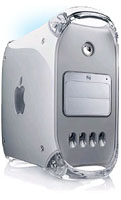 |
Commercial solutions
Easy Do-It-Yourself Solution
If the above solutions do not work for your setup (or even if they do), a simple modification of an existing VGA adapter is all that it takes to fool your Mac into thinking that it has a monitor attached. The following is based on on the Apple tech articles "15987 Macintosh Monitor Sense Codes: Technical Description" and "14890 Macintosh Displays: Overview of Sense Codes and Adapters".
This solution is fast, quick and essentially no cost! It solves both the Timbuktu issue and allows hot-swapping of displays. Use the following at your own risk, of course; we are not Apple-authorized technicians and will not be responsible for any damage, mayhem, injury, death, global chaos etc. that results from the following:
- Find a VGA/Mac adapter. If you have older Macs around, you already have several of these. If not, you can buy something substantially similar at your computer store. This particular one is designed to adapt a VGA monitor port to the older style Macintosh monitor plugs. In theory, a VGA-whatever adapter will work as long as you can figure out the pin numbers:
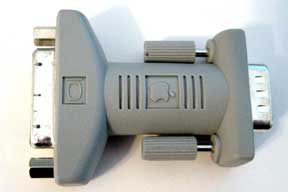
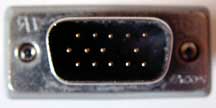
- Cut two small (2-3 cm) pieces of single-strand copper bell wire and strip the ends. You may find it easier to strip the entire wire and then slide the small piece of insulation back on. Then bend the wires into a "U" shape. These are the jumpers we'll use:
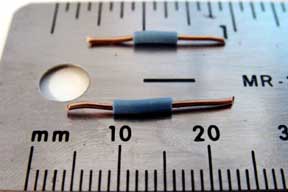
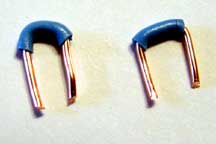
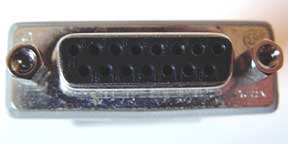
- Look closely at the female side of the adapter (the one with the holes). In the example below, there are numbers 1-15 to the right of each of the pin holes and the numbering goes right to left in the two rows. Use one of your jumpers to connect holes 1 and 2. Use the other jumper to connect holes 4 and 10. Push the wires down firmly and make sure they are seated.
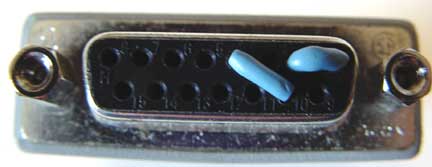
- Shut down your Mac and connect your altered adapter. If the Mac does not have a VGA monitor port, use an appropriate adapter. For example, mirrored drive door G4's will require you to plug in the DVI-VGA adapter; plug your modified VGA-Mac adapter into that.
- Restart your headless Mac. It will now think that it has a 16" Apple RGB monitor attached. Timbuktu should work fine, and you should be able to swap a monitor on and off without putting the Mac to sleep or rebooting.
Note: Apple recommended in tech article 21236 Power Macintosh: Setting up for Use Without a Monitor that users turn off any screensavers for headless operation.
Finally, we'll note that one can simply jump the pin holes on the computer's monitor port instead of using an adapter. But this makes it harder to simply pop a monitor on and off as you'll need to remove and replace the jumpers each time (and put them back in the correct holes without losing them).
Return to the ILPI Miscellaneous Help Page